Showing posts with label Photography. Show all posts

New Year, New Adventure


       Days past really fast and 2015 ended perfectly, and here comes 2016 holding many surprises and new things for me, as I started a totally new life recently and I thought I would share it with you. I'm not a good blogger but I'm trying my best with this.

       As some of you know I've been waiting to be reunited with  my boy  "Omar", which last time in 2013 we met. and since then me and my boy got engaged and married and he went back to US as he was living in Chicago, IL  since 2010.
      After that I stayed where I always lived , Baghdad,Iraq. There was up and down days while we are waiting, not with our relationship but it's just '' waiting'' is not something easy but we are strong enough to get through this.

        To get to US, you have to go through a long specific process especially if you're coming from Iraq, which for me the process took more than 2 years.

       And finally the good news coming....
 On one of October days at 5 am, Omar called me, '' you're coming !'' he said '' you're coming on December '' , my feelings at that time can't be described. I couldn't wait to tell everyone.
As I was so excited I started packing my bags since morning that day, my flight delayed about a week from first flight date, but that was okay, I got the chance to see my little brother who's living in Malaysia.

   Anyways the flight day came, 7th of Dec,2015. It was hard to goodbye your beloved people and not easy to leave behind the place you lived in for 25 years, but this is life and some people worth to start over with.

    My flight from Baghdad to Amman was a piece of cake , I stayed overnight in a hotel in Amman,Jordan. Second flight was "13 hour" from Amman to New York, JFK, '' I will soon write a post about it''

   Finally I'm there at JFK, my eyes was scanning around and there I found a handsome man holding flowers looking at me, I push my luggage away and rush to him, and here was the new start of journey.

  As 2015 was passing, we had our first '' new year'' together, and many other "first time" things. I'm happy with how 2015 ended and how 2016 started.

I would like to share some of my 2015 photography, even I didn't shoot much.


Have a nice day !

52 weeks Challenge


For this year (2015) I decided to do something new as well as to get my skills and abilities better and better, So I'm starting a "52 weeks Challenge" But instead of ONE challenge I'm making TWO,

First: 52 Weeks Photography Challenge 


I know myself I can't do 365 days challenge because it would turn so much pressure on me, and I'd turn up not finishing it, so a 52 weeks is much easier, also it's a free scheduled :D
I will be posting weekly photos on my DeviantArt, Instagram, and Facebook.

Second: 52 weeks Cooking Challenge 

  As I'm wife to be so I need to learn recipes as much as I can. In particpate with my sister and my cousin, we will draw one recipe each week.
Most recipes based on an old Arabic (Iraqi) cooking book named " Cooking & nutrition Guide" it's in Arabic but I will translate each week's recipe into English if possible.

My 2015 Photography Goals


As last year I posted about 2014 Photography Goals, so now it's a new year with new goals.

Hoping this year my skills would gets better and better.
Here's below my goals/plans;

1- Upgrading My Lenses Kit.   I'm thinking of having Nikkor 50mm 1.8 lens. 
2- 52 Weeks Challenge
   
Instead of one challenge, I'm doing TWO "52 weeks Challenge" one for cooking and the other for photography.
3- Improve my Food photography skills.    Because I'm doing the "52 weeks Cooking challenge" so I want to take a nice photos for the food I cook. 4- Make a mini studio for macro/food photography.

5- Learn new things about photography


That's all I remember right now ! 


One Of The Reasons Why You Should Shoot RAW ?


Why I always Shoot Raw ? and here's one of the reasons;
because I'm not always having a good lightening source so shooting RAW give me ability to fix my shots later on Lightroom and bring back details into the dark areas and lighten my shots by increasing exposure unlike JEPG images that has very limited range of flexibility. 

The video below showing how I turned a dark Shot into a good lightened image. 

" It's not a tutorial video " but I hope it would be helpful !

How To Create Your Own Watermark

   
     Since we're publishing our art everywhere on web and can't control who can use it, and no one like to see his/her photo being claimed as others work. 

Watermark or copyrights help a little to prevent others from stealing your efforts, or at least make it difficult for them to erase your name. 
I found many ways to add a watermark and I'll list few for you to try them out !

Method 1 : Text tool Watermark in Photoshop
Method 2 : Brush Watermark in Photoshop
Method 3 :  Plug-in Watermark in Photoshop
 

DETAILS

Method 1 : Text Tool 

Step 1 : 
Choose Text Tool ( T ) 


Step 2 : 
Pick your favorite font 
and start typing your watermark 


Step 3 : 
 You can re-position and re-size your mark by the Move tool 


Step 4 :
 Decrease Opacity to make a transparent watermark


Method 2 : Brush Watermark

 
Step 1 : 
Open Photoshop then go to " File > New " 


Step 2 : 
Select the below setting for your new project then click "OK": 
Width: 1000 Pixels
Height: 1000 Pixels
Res : 300 Pixel/Inch
Background : Transparent


Step 3 :
With text tool ( T ) and after choosing your font write down your text


For adding another text below or somewhere first click on the check mark [✓]


Then while you still using the text tool click where you want to type another text.


after you're done click on the check mark again [✓]

Step 4 : 
Choose the crop tool 


Select your text 


Then click the check mark [✓] or press " Enter " on keyboard 


Step 5 : 
Go to " Edit > Define Brush Preset "


Then name your watermark and click OK 


Now your Bush is ready to use !

Step 6 : 
Open your image then click on brush tool


Right click anywhere on your photo and go down to the end of your brushes you will find your new brush, click on 


Change opacity by the slider above the image


Or by the Opacity slider above layers, while you're selecting the watermark layer.


And you can change the color of the watermark 


resize your brush and click on the image where you want your watermark to be 


Method 3 : Watermark Plug-in 


I recently found a helpful watermark plug-in from Russell Brown. [ Download Link ] 
ٍScroll down into Russell Brown site you'll find a link of tutorial video beside " Adobe Watermark Panel 2.2.2 "
I still didn't use it but it's easy, download it and start discovering. :love: BTW it's FREE la in love 


:bulletpink::bulletpink::bulletpink: This post Published first on DeviantArt by me for my group Support-beginners


Thanks For Reading
Little Pixel Heart 


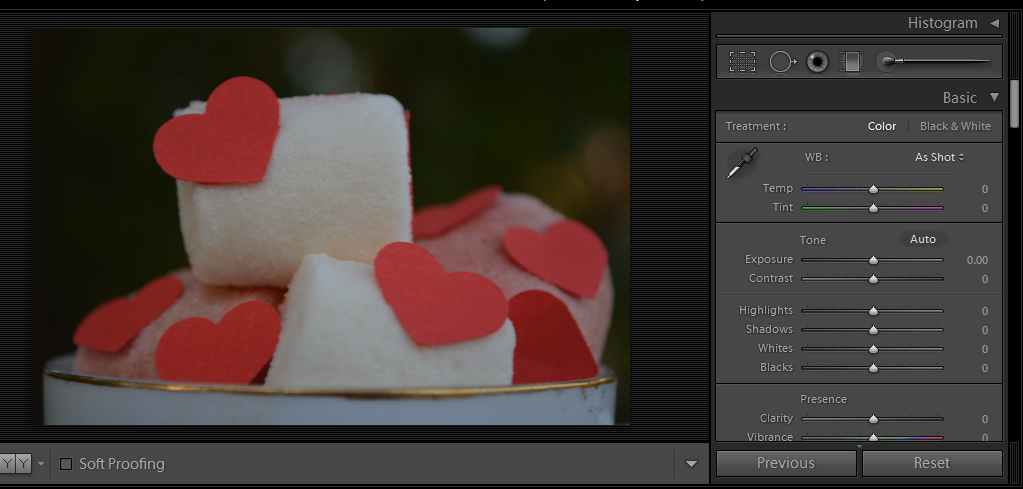
Easy Basic Editing in Lightroom

Adobe Photoshop Lightroom is a great software for photographers to start with, and a good start point to turn over your photos from a pale and flat to a perfectly edited with only few basic tools.
Lightroom can do more than just basic color correction, you can turn photos into dramatic ones.
I use Lightroom with almost every photo before I export it to Photoshop.

Anyways, Let's do these few steps to turn over your photo;

 Into the " Develop " section you gonna find " Basic " Panel, do the following ;


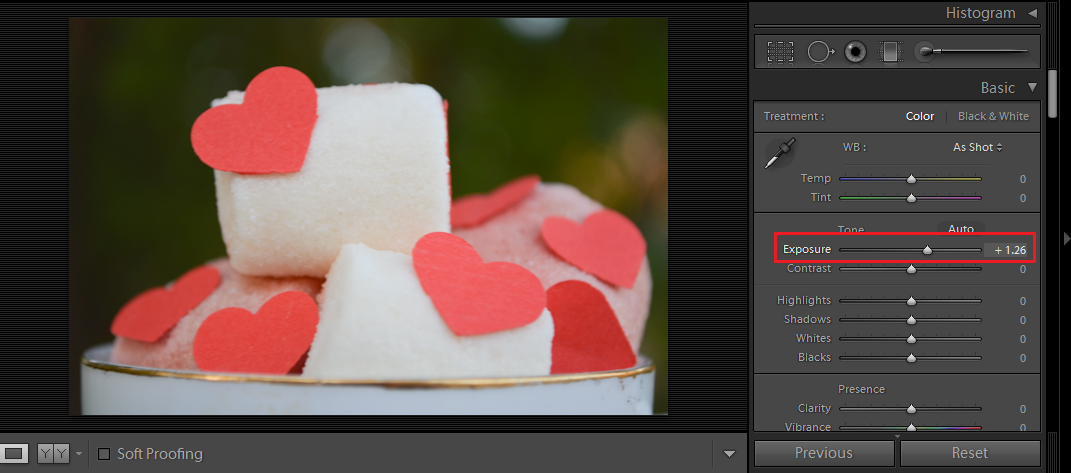
Rose Bullet - F2U! by Drache-LehreStep 1 : Exposure 
increase to give your image more light. for below photo i preferred +1.26


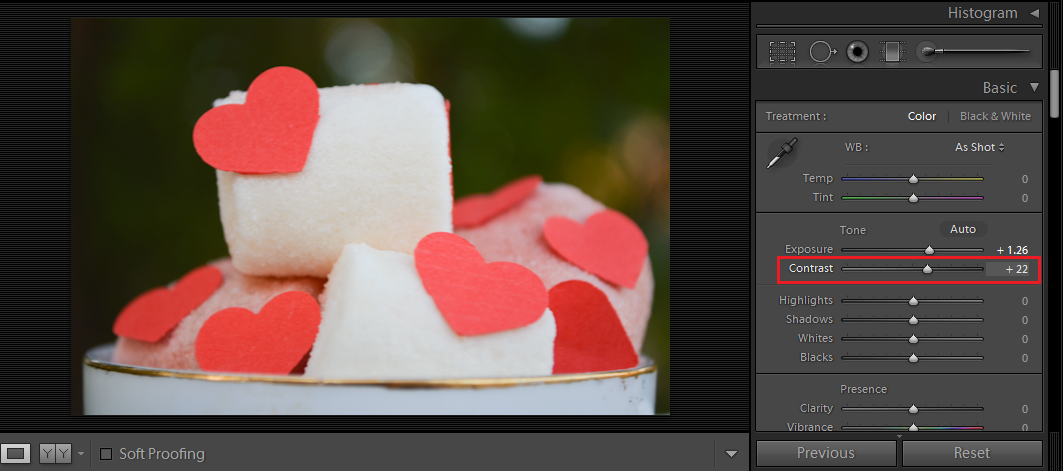
Rose Bullet - F2U! by Drache-Lehre Step 2 : Contrast 

Increase a bit, for me I don't like the black areas to be so black but I like the photo to be well contrasted. +22


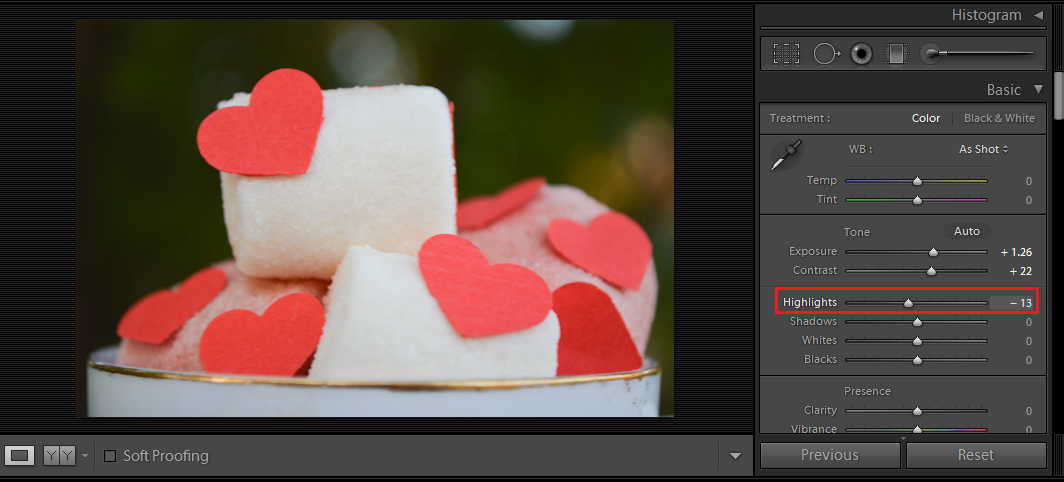
Rose Bullet - F2U! by Drache-Lehre Step 3 : Highlights

For the highlighted area. sometimes highlights kills details, so my settings is -13 .


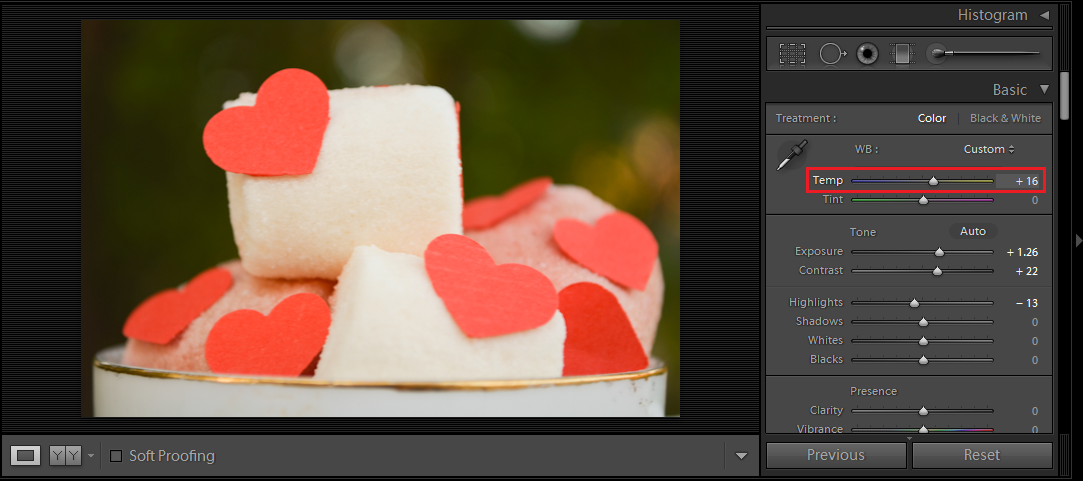
Rose Bullet - F2U! by Drache-Lehre Step 4 : Temp (temperature )
To add warmness (yellowish) or coldness (bluish ). I added warm tune +16


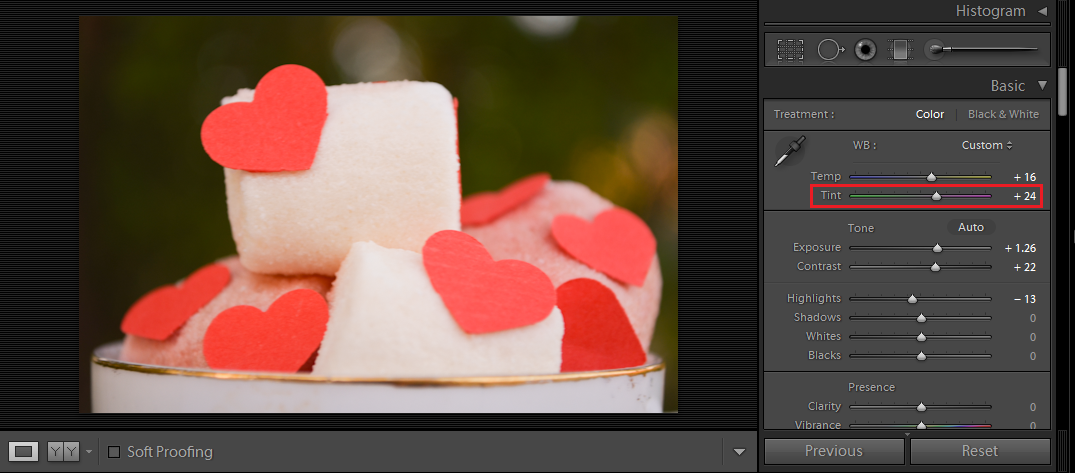
Rose Bullet - F2U! by Drache-Lehre Step 5 : Tent

When ever I add warmness to the image I increase tent a bit because I feel it turns a bit greenish so increasing tent add a bit red tone. +24


And that's it ! We're done !


Any question ! ask in a comment .


How To Get Inspired !


How to get inspired ?

*photo by  Nelleke  Pieters 

Just take a deep breath and do the following :

Think with yourself " I like photography, but what's my favorite photography type? landscapes? portraits? macro? still life? or other types?where I can find myself within all types of photography ?"

*Photo by  
Brenda Waworga

Go to Google search and type down "photography"then scroll and watch the photos to see what is the type interests you most !

*Photo by  Kendell 

open the picture which attracted you take a deep look on the photo. and ask yourself the following questions:

*Photo by Francesca 
Why I liked that type of photography? what is special about this photo? what does it contain? What lights source been used ? what camera settings could be used? What filters and affects added?For example:


*Photo by Anna Brown 
If we got this photo, let's answer the questions together;I liked that type of photography because I like nature, especially flowers. the special about this photo is the soft pink tone, I like pink.it's contain, a group of pretty pink flowers, part of green tree, and the sky. . camera settings properly was +60 shutter speed, ISO 100 ( because there is enough light)it's might used simple color correction with a slight pink tone.

after that get yourself inspired to snap similar shots, go to search again type " flowers photography "  or the type you like 
scroll and watch.

*Photo by Anastasia Ri 

Train your photography eye, this is really important!always watch some photos.

*Photo by  Kim Partridge 
Do this everyday for at least few minutes, and see how your photography eye get better and better !

*Photo by  Anders Nilsson 

try this method : "Copy & Paste "
find a photo you like and try to shot one exactly the same 

*Photo by  Tracy Jones

try over and over. 
it's not stealing someone's else ideas it's just for training your vision to introduce shots similar to the ones you always dreamed of.

*Photo by  Bebe Mozz

I tried this before and I felt great !
 I got into the type of photography I like and some of my shots inspired other people !

*Photo by  Dmitrijus Druteika

Now get inspired!
Grab your camera and get busy !

But first answer in a comment ;
- What's your favorite type of photography?
- How you get inspired?
Share it with us :heart: