What is a Photoshop action?
Photoshop action is a recorded photo editing steps, using Photoshop. Many people recorded their own editing steps and share it for public to use.In DeviantArt.com, Photoshop actions are really popular among photographers, Some are free to download and use. Photoshop actions usually come as a RAR/ Zip file.
How to download a Photoshop Action? { On DeviantArt.com }
Step 1
Search for Photoshop actions
Step 2
Pick your desired action click on, then click on the download button on the right

Step 3 Press on "Download" button and choose a folder to save in. Then press "Save"

How to use a Photoshop Action?
Step 1 After downloading the action, go to the folder you saved the action file in.
then right click on the file, then Extract to...
and it should be like this

Step 2
Open Adobe Photoshop and open a photo.
Step 3 Go to " Window" then " Action "
Step 4 New window on the right will be open. press on the little arrow on the top right corner
Step 5 Go to " Load actions" and click on
Step 6 Go to the folder you saved and extract the action file in,
double click on the folder then click on the "atn" file then click " Load"
Step 7 Go to your background layer double click on to unlock. new window will open click "OK"
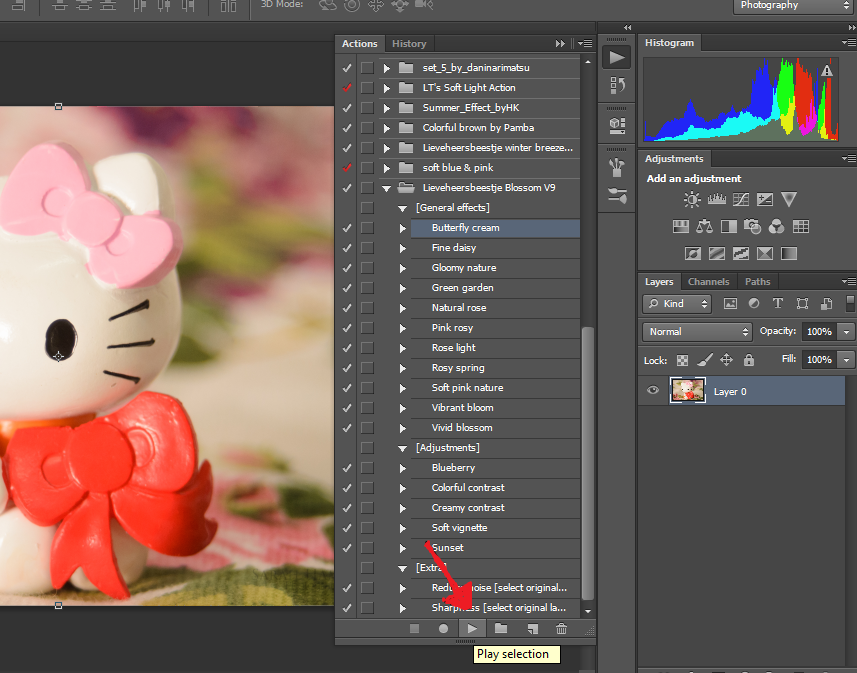
Step 8 Select the action you want then click on the " Play" arrow in the bottom to apply and watch changes
The Result

How to record your own Action ?
Step 1 Open the actions window same as in the step 3 above
Then click on the folder shape below under the actions lists to create an " action Set "
Then name the set and click " OK"
Step 2 Click on the fold Paper shape to create new action
Name your action and click "Record"
The Red dot will be on

Step 3 After editing your photo all the steps will be recorded click on the square " Stop" button and you're DONE
*Action used
Here* Photo credit @ Sarah Hamid
Link


